
Free to use, no subscription
SEOdune — Google Search Console
in your pocket.
SEOdune is a mobile app for Google Search Console — bringing your site's clicks, impressions, sitemaps, and indexing status to your phone for checking in on the go, no laptop required.
Sign in with your Google account — no separate signup.
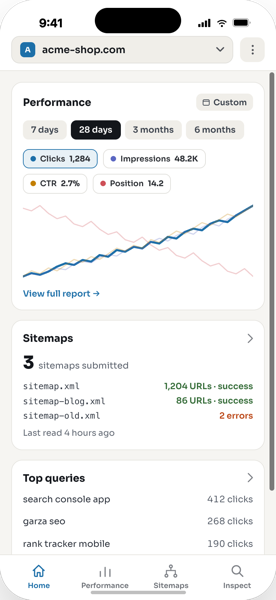
Everything Google Search Console shows you, mobile-first
Switch between properties, read your performance trend, and check indexing — all in a few taps.
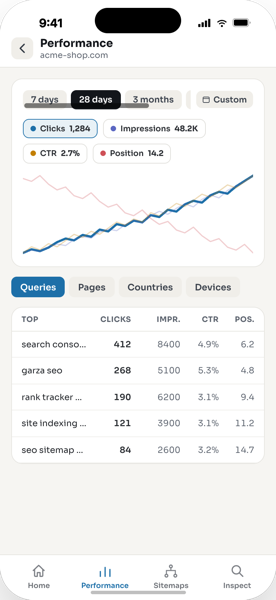
Performance
Clicks, impressions, CTR, and position — trended
Pick a date range, tap a metric to spotlight it on the chart, and drill into Queries, Pages, Countries, or Devices for the full breakdown.
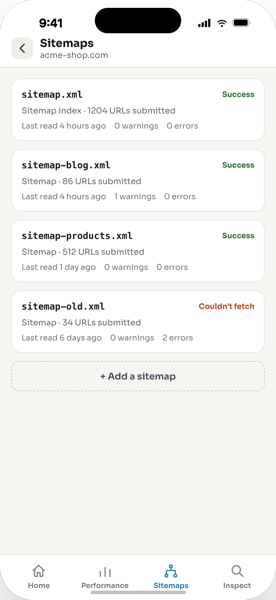
Sitemaps
Know the moment a sitemap breaks
See submitted counts, warnings, and errors per sitemap, plus a full detail view — no more finding out from a ranking drop.
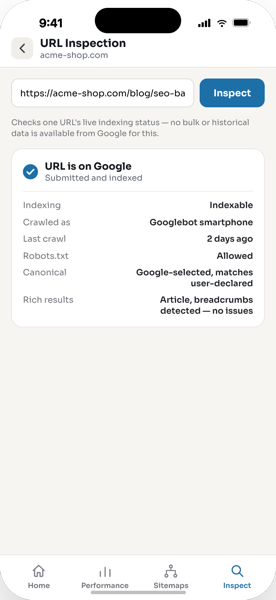
URL Inspection
Check if a page is indexed, right now
Paste any URL on your property and get Google's live verdict — indexing state, canonical, crawl details, and rich results.
Coming soon
Realtime rankings are on the way
Search Console data lags 2–3 days behind. We're building a realtime view so you can see how you rank the moment it changes — launching as an optional paid upgrade. Everything you see above stays free.
Frequently asked
Is SEOdune free?
Yes — every feature shown above (performance, sitemaps, URL inspection, property switching) is free, supported by a small banner ad. No account tier, no trial.
Do I need a separate account?
No. Sign in with the same Google account you already use for Search Console — SEOdune reads your existing properties.
What data can SEOdune access?
Only Search Console data for properties you already have access to: performance, sitemaps, and URL inspection. It cannot change your site or your Google account settings.
Why does SEOdune need access to my Google account, and how is my data used?
SEOdune connects to Google Search Console through Google's official API using the account you sign in with — that access is what lets it show your performance, sitemaps, and URL indexing data. It has no server: your data is fetched directly from Google to your device and is never stored or processed by us, and it only submits or removes a sitemap when you explicitly ask. It never accesses Gmail, Drive, Calendar, or any other Google service. Full details are in our Privacy Policy.
What is "realtime rankings"?
Search Console's own data lags 2–3 days. Realtime rankings will show your current position as it changes, pulled from a live rank-checking service — planned as an optional paid add-on once it ships.
Which platforms is it available on?
iOS and Android, via the App Store and Google Play.
Get SEOdune — free today
Sign in with the Google account you already use for Search Console.